Tooltip is a splendid invention. Small detail in web design that plays a big role when it comes to user experience. Usually, tooltips are used to present a tiny amount of hidden content (mainly explanatory, so-called tips), that pops up when user moves a cursor over or clicks (less common) on a special target.
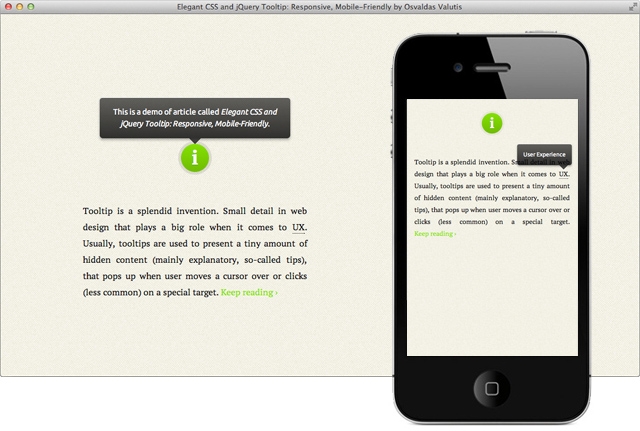
When working on my personal website, I was in need of a tooltip. I decided not to limit it just on a typical definition of a tooltip, but also make it a better occurrence using CSS and jQuery technologies.
Key Features
- It's responsive. It relies on a maximum width value when viewed on large screens, adopts to narrow environments and picks the best viewable position relatively to the target (top, bottom; left, center, right);
- It's mobile-friendly. It pops up when a call-to-action button is tapped and disappears when tapped on the tooltip itself;
- It's HTML formatting capable. Need to write some words in italic or so? No problem, this will work out.
CSS
To begin with, let's build the look of our tooltip. No fancy styling, just major properties so you can clearly see how it works (all of the sexy things will take part in the demo below).
#tooltip
{
text-align: center;
color: #fff;
background: #111;
position: absolute;
z-index: 100;
padding: 15px;
}
#tooltip:after /* triangle decoration */
{
width: 0;
height: 0;
border-left: 10px solid transparent;
border-right: 10px solid transparent;
border-top: 10px solid #111;
content: '';
position: absolute;
left: 50%;
bottom: -10px;
margin-left: -10px;
}
#tooltip.top:after
{
border-top-color: transparent;
border-bottom: 10px solid #111;
top: -20px;
bottom: auto;
}
#tooltip.left:after
{
left: 10px;
margin: 0;
}
#tooltip.right:after
{
right: 10px;
left: auto;
margin: 0;
}
JavaScript
$( document ).ready( function()
{
var targets = $( '[rel~=tooltip]' ),
target = false,
tooltip = false,
title = false;
targets.bind( 'mouseenter', function()
{
target = $( this );
tip = target.attr( 'title' );
tooltip = $( '<div id="tooltip"></div>' );
if( !tip || tip == '' )
return false;
target.removeAttr( 'title' );
tooltip.css( 'opacity', 0 )
.html( tip )
.appendTo( 'body' );
var init_tooltip = function()
{
if( $( window ).width() < tooltip.outerWidth() * 1.5 )
tooltip.css( 'max-width', $( window ).width() / 2 );
else
tooltip.css( 'max-width', 340 );
var pos_left = target.offset().left + ( target.outerWidth() / 2 ) - ( tooltip.outerWidth() / 2 ),
pos_top = target.offset().top - tooltip.outerHeight() - 20;
if( pos_left < 0 )
{
pos_left = target.offset().left + target.outerWidth() / 2 - 20;
tooltip.addClass( 'left' );
}
else
tooltip.removeClass( 'left' );
if( pos_left + tooltip.outerWidth() > $( window ).width() )
{
pos_left = target.offset().left - tooltip.outerWidth() + target.outerWidth() / 2 + 20;
tooltip.addClass( 'right' );
}
else
tooltip.removeClass( 'right' );
if( pos_top < 0 )
{
var pos_top = target.offset().top + target.outerHeight();
tooltip.addClass( 'top' );
}
else
tooltip.removeClass( 'top' );
tooltip.css( { left: pos_left, top: pos_top } )
.animate( { top: '+=10', opacity: 1 }, 50 );
};
init_tooltip();
$( window ).resize( init_tooltip );
var remove_tooltip = function()
{
tooltip.animate( { top: '-=10', opacity: 0 }, 50, function()
{
$( this ).remove();
});
target.attr( 'title', tip );
};
target.bind( 'mouseleave', remove_tooltip );
tooltip.bind( 'click', remove_tooltip );
});
});
HTML Example
<abbr title="User Experience" rel="tooltip">UX</abbr>
How To Implement
- Put the CSS code anywhere in existing CSS file or create a new one. You can also insert it in HTML file in head by wrapping the code with
<style>and</style>tags. - Put the JavaScript code in existing JS file or create a new one. You can also insert it in HTML file in head or, better, body by wrapping the code with
<script>and</script>tags. - Assign the attribute
rel="tooltip"andtitle="Enter your tip here"to any of body tags in HTML file where you want the tooltip to pop up when called. Set title value with your tip (use<strong>,<em>etc. to distinguish text fragments, but avoid block elements).
Also, be sure that you already have jQuery library included.
That's it! Simple enough. If you've got any suggestions or insights, feel free to share them: leave a comment or send me a tweet.


118 comments. Write?
Siek tiek daugiau komentatu apie pati koda noretusi… Bent kas ka kokioje vietoje daro. T.y. koda skaidyti galima dalimis, o visa pilna leisti parsisiusti :) Tik 2 centai kaip sakoma. Visa kita liuks!
Got it ;-)
Hei Osvaldas? What’s language is that? I don’t understand…. :) And the tooltip is very useful for me, i have using twitter bootstrap, but it does’nt work. So i decided to find the plugin for jQuery tooltip, and found it on your site.
Great work, it even degrades nicely down to IE7
Thanks for pointing that out, Greg. Looks like I forgot to add a paragraph titled “Browser Compatibility”!
Thanks for this plugin! It works great!
Excellent and super easy to implement. Is is possible to change the default orientation (e.g. bottom)? Thanks.
Seems simple as can be, but just won’t work for me. Spent a couple hours fiddling with it, even copied and pasted from your demo page but no luck. Frustrating, so I gave up.
Fixed! I put the js in a separate file and it works fine now. Wouldn’t work when js was added in to a “custom” file with several other scripts. Great work, thanks!
Interesting. I have it (on this site) in a file with other scripts. Probably some kind of conflict in your case. Glad it worked out in the end!
Very useful and good looking tooltip.thank you.
I will use in my projects ! :)
Thanks a ton, nice, simple, clean and easy to install etc.
Hi! Thanks for your solution. How i can reinit your code if added new lines with rel=‘tooltip’ after jajx calling?
Try changing
.bind‘s in the JavaScript code to.live.Osvaldas Valutis, thank you! Working! :)
I noticed that using live doesn’t seem to work on iphone/ipad, I switched it to livequery and it works.
demo link is broken.
xwlee, thanks for noticing that – fixed.
Excellent, just for Me !!!
Very useful tutorial for make mobile tooltips. Thanks for sharing
Works great !! however if you change the orientation when the tooltip is poped up, is does some crazy shit and seems to break all tooltips. I had to refresh to fix the issues.
Yes, that actually happens sometimes. I’m going to get back to it later and revise resizing.
Reissy, This is great! Thanks for sharing. Just need to work out that orientation change bug.
Excellent, Great work!
Osvaldas, this is a great tooltip. Thanks for creating and sharing it.
I did have one small issue though. It only seemed to work on mobile Safari without the www. - E.g. domain.com works but http://www.domain.com doesn’t.
I got around this by linking to the js using the absolute URL rather than the local one: E.g. [removed][removed] rather than [removed][removed]. Any ideas why this is?
Ddly, Sorry, the comment system removed my example scripts. Hopefully you can work out what I’m trying to say without them!
Looks like a server configuration fault, isn’t it?
thank’s a lot
How can I remove the default tooltip in IE9?
http://we-designstudio.com/ABS-ScreenShot2012-05-01at4.31.25PM.png
Thanks
Wayne Erickson,
I have the same problem. Is there a way to suppress the default tooltip in IE?
All means, please also supports zepto.js
Figured it out. If you’re using IE as your target browser, you can avoid the duplicate hover by doing something like this:
hover me
Name it whatever you want, then just change the jquery:
tip = target.attr(‘helper’);
Mitch,
Thanks for the reply, good suggestion, I’ll give it a go.
In the meantime I set up Twipsy, also another nice tooltip… thanks again!
Could you show me a link where this solution works? I am having trouble understanding where to implement this code.
-Thanks
Never mind. Works perfectly thanks
Hi your smarter than me…how did you figure out how to implement the above code to avoid the duplicate hover in IE?
...ok I figured out! =) what worked for me to remove the double tool tip in IE…
I replaced line 17 in the Javascript code with:
target.removeAttr( ‘title’ ).attr(“title”, “”);
Great article!...any suggestions on how to allow a block level element inside tip?...a call to action button for example
WOW its good…tnx u….
Can you give some thing Same for Mobile browsers
Nice tooltip!
This page seems pretty concise, nice.
how can I effect onto image? seems it doesn’t work..
nm, ignore the code above!!
shows that i need to get some sleep
Hey, thanks for this post!
If someone is looking for a little ‘delay’ to display this tooltip just change lines @56 to @59, like this:
setTimeout(function () {
tooltip.css( { left: pos_left, top: pos_top } )
.animate( { top: ‘+=10’, opacity: .85 }, 50 );
}, 500); // play with this 500 and look for what delay time you want for…. [ 1000 = 1 second ]
If you want to use this with WordPress, just change all $ for jQuery and it will work fine!
Thanks again
Very nice tooltip example. Thanks
Thanks for sharing this. I have a question/issue: the tooltips are working but they are appearing at the top of the page rather than above the hover/click point. I have copied and pasted everything from here and tried separate files for the js, adding the script to the body tag, but no luck. Any ideas please?
Cool stuff!! There seems to be a glitch when using with large(r) images as the execution point.
For example I have a link on an image that’s 316x200px and when I hover the tooltip shows but when I hover on the tooltip area it starts “flickering” and glitchy.
Otherwise cool stuff. If you have any pointers that’d be great
I got that when it was to close to the top
It is a nice tooltip. It works in browser but doesnot work with jquery mobile. Any Ideas?
Thanks for sharing a great example. It has been introduced in the Japanese book called “Responsive Web Design Standard Guide “. It is planned to use on my website someday. Thank you!
Image maps area: has anyone implemented this script on image maps ? I’m testing it on “area” elements but, it always stays on the middle-top of my image, completely ignoring the area element positioning. Any toughs ?
Were you able to get image maps to work? I’m trying it now and can’t even get the tooltip to show.
As a follow-up to the image map issue, I went ahead and created my own sort of image maps using ‘a’ tags that have position:absolute and are moved around appropriately over an image. You can see it at http://www.maf.org/connect.
If you want to consider the scroll position of your page add:
if( pos_top < 0 || pos_top - $(document).scrollTop() < 0)
Then if you scroll up and the target is directly on top of viewport the tooltip is displayed below the target and thus is not out of the viewport.
lo provare
I would highly recommend changing all of the bind calls to .on() calls. Fixed a bunch of stuff for me.
+1
I want to show this below the hover element. However when I tried to adjust the positions , although it worked, it is flickering for some time before being steady. How do I get rid of this problem ?
Lovely script btw.
I would want to use this on image maps. Is there a way that the tooltip can follow the curser rather than centre top of an image?
Seems to be an issue in combination with jquery-1.8.2 (or above?).
Hi, I wonder if we can have a link in the tooltip? I tried, it broke. Thanks.
I got it. I used htmlentities on it. Yea it doesn’t make sense to have a link on a tooltip because it disappear as u hover away but clients are funny group of people some times.
I experienced issues with w3C-validation To make this validate as HTML5, and also work flawlessly in IE as well as in other browsers i used this code:
Trigger content
For the change to work a small change in the js-file is necessary as well:
var targets = $(’[abbr.tooltip’),
Oops - where did the code go?
<abbr title=“This is the tooltip text” class=“tooltip”>
<span class=“abbr” title=”“>
Trigger content
</span>
</abbr>
Thank you for your tooltip! However if I have a tooltip already using javascript but not responsive could I add your script to my existing and make it so?
useful plugin thanks for create it.
Hey, thanks for a really great tooltip plugin, it looks wonderful on my site.
However I use a very basic Facebook integration with LIKE buttons and realised after a couple of days that it was this javascript that had broken the integration - presumably due to some of the onload variable definitions. I changed all of these to be prefixed with “t_” and also added a declaration of the “t_tip” variable outside of the function.
Here is my updated version in case it helps anyone else:
var t_targets = $( ‘.has_tooltip’ ),
t_target = false,
t_tooltip = false,
t_tip = false;
t_targets.bind( ‘mouseenter’, function()
{
t_target = $( this );
t_tip = t_target.attr( ‘title’ );
t_tooltip = $( ‘’ );
if( !t_tip || t_tip == ‘’ )
return false;
t_target.removeAttr( ‘title’ );
t_tooltip.css( ‘opacity’, 0 )
.html( t_tip )
.appendTo( ‘body’ );
var init_tooltip = function()
{
if( $( window ).width() < t_tooltip.outerWidth() * 1.5 )
t_tooltip.css( 'max-width', $( window ).width() / 2 );
else
t_tooltip.css( 'max-width', 340 );
var pos_left = t_target.offset().left + ( t_target.outerWidth() / 2 ) - ( t_tooltip.outerWidth() / 2 ),
pos_top = t_target.offset().top - t_tooltip.outerHeight() - 20;
if( pos_left < 0 )
{
pos_left = t_target.offset().left + t_target.outerWidth() / 2 - 20;
t_tooltip.addClass( 'left' );
}
else
t_tooltip.removeClass( 'left' );
if( pos_left + t_tooltip.outerWidth() > $( window ).width() )
{
pos_left = t_target.offset().left - t_tooltip.outerWidth() + t_target.outerWidth() / 2 + 20;
t_tooltip.addClass( ‘right’ );
}
else
t_tooltip.removeClass( ‘right’ );
if( pos_top < 0 )
{
var pos_top = t_target.offset().top + t_target.outerHeight();
t_tooltip.addClass( ‘top’ );
}
else
t_tooltip.removeClass( ‘top’ );
t_tooltip.css( { left: pos_left, top: pos_top } )
.animate( { top: ‘+=10’, opacity: 1 }, 50 );
};
init_tooltip();
$( window ).resize( init_tooltip );
var remove_tooltip = function()
{
t_tooltip.animate( { top: ‘-=10’, opacity: 0 }, 50, function()
{
$( this ).remove();
});
t_target.attr( ‘title’, t_tip );
};
t_target.bind( ‘mouseleave’, remove_tooltip );
t_tooltip.bind( ‘click’, remove_tooltip );
});
I’d like to change the default orientation from top to right. Is that possible?
This is great. Now the tooltip is useful.
Thank you! Osvaldas Valutis
This is a great little piece of code, but there is no way ‘tooltip’ is going to validate as proper html. Is there a way of rewriting this so that the tooltip functions by wrapping the text in a span tag with its own class attribute?
Cheers
I
Thank so so much, I searched all over the net for this and none ever worked instead the codes i got make mine show double title tool-tip…..thanks a lot it worked perfectly…100%
There is a problem with the tooltip display. The tooltip is always displayed in the center of the item (that requires tooltip). However, if the item is located near the left border or the right border of the width, it will get cut off and you can’t see the whole tooltip. What shall I do?
still does not work with image maps… ;(
I mentioned this in another comment, but wanted to mention it directly to you, MARIUSZ-TROJMIASTO.US. You can create your own image maps (though, it only works with square shapes) by doing something like this:
I guess it stripped my code. Let me try it like this:
I mentioned this in another comment, but wanted to mention it directly to you, MARIUSZ-TROJMIASTO.US. You can create your own image maps (though, it only works with square shapes) by doing something like this:
< div class="imagemap" >< a absolute; width: 50px; height: 50px;" title="FIRST LINK" href="URL" rel="tooltip nofollow" > < a > < a absolute; margin-top: 50px; margin-left: 50px; width: 25px; height: 25px;" title="ANOTHER LINK" href="URL" rel="tooltip nofollow" > < a > < a absolute; margin-left:75px; margin-top: 100px; width: 30px; height: 30px;" title="ONE MORE LINK" href="URL" rel="tooltip nofollow" > < /a > < img src="PATH-TO-IMAGE" width="800" height="600" / >< /div >
hello everyone,
i love this tooltips and want to use them in my wordpress website, but have some problems with the js script.
can someone help and give me a script which is ready for uisng in wordpress?
br
newbie2004
It depends on the theme you use.
I works well with my WP.
But it doesn’t talk to image map :
@mariusz: and you had only pasted the above mentioned code into you header inside [removed] & [removed]?
well.. yes…
I’ve made it and add newest jquery call.
Awesome tutorial! Tooltip worked like a charm for me and it looks great, thank so much!
Thank you for something so simple to use and elegant.
Thanks for the great piece of code.
I wonder is this free to use?
is there any license?
I love this tool tip. It’s simple and straight to the point.
Just in case anyone wants to add a delay to avoid tripping the tool tip.
Add delay(800). before animate on line 57 . 800 being the milliseconds.
Example:
.delay(800).animate( { top: ‘+=10’, opacity: 1 }, 50 );
oops ignore the code above…i didn’t catch myself on time..
I’ve slider and tooltips and slides down with the slider, its only happens for ie8 and lower, any one can help me to resolve that problem
This is not working correct for me on iPad running IOS 6.1 using html5 pages. I have multiple elements in a page than need tooltip functionality (for abbreviation purposes). I can click one, it will popup, but if I select it again, most of the time it will not close it, neither tapping the element or the popup. And sometimes if I have a popup open, and then tap to open another, ‘sometimes’ I can click it to close it, and it will close the other one. Only things I’ve change from above code is the selector, and change the .bind calls to .tap:
var targets = $( ‘my tag name’ ),
...
target.on(‘tap’....
tooltip.on(‘tap’..
It works Great…...! Thank you :)
Hiya, wonderful script. Any way to include an image inside the tooltip?
Just add this code on the anchor ahref link
title=”<img src=‘http://magazine3.com/gamingzone/photos/screen1.png’ />” rel=“tooltip”Hi,
Lovely script, works well on mobile, I get problems on desktop though. When I resize browser window to the height of about 300px using the demo page (so that the tooltip text appears below the tooltip icon) and position the cursor at the bottom part of the icon, the tooltip flickers rapidly. I observed it on the current Firefox 19.0.2, Chrome 25, IE 10. Firefox seems to be the worst, as on other browsers the flickering settles after a short while. On Firefox it just continues to flicker. Any thoughts?
It is really a nice and easy to implement script. I faced problems on firefox the tooltip in continuely blinking. On mobile if it is associate to a clickable img is simply not working. Can somebody help??
Thanks in advance
Hey Osvaldas,
lovely tooltip. Thanks for that. Maybe you or someone else can help me extend this script a bit?
My tooltips will often contain links. Currently links in tooltips wouldn’t work because the tooltip will fade away as soon as the mouse leaves the “targets” and enters the tooltip.
So if anyone would have an idea how to achieve leaving the tooltip open if one hovers over the tooltip i’d love to hear it!
Thanks!
Hi Stefan, thanks for that! When I was designing it I wanted to make it as simple as possible in all the ways and do not drag it far away from the native browsers tooltip (that tiny yellow). I am not quite sure if hover-able and links containing tooltip would match this definition. One thing I’m sure is that it cannot be done fast. Anyway, I will be working on the second version of the tooltip soon and will definitely consider your idea. Thanks!
Thanks a lot for the quick reply Osvaldas! Understood, no problem. I’ll use jquery.tooltipster.js meanwhile which supports this. Would have preferred a lighter weight solution like yours though.
A small suggestion: you can make the tooltips keyboard accessible by changing line 8 to:
targets.bind( ‘mouseenter focus’, function()
and line 73 to:
target.bind( ‘mouseleave focusout’, remove_tooltip );
Hi there, I made a WordPress plugin based on your tooltip, check it out here:
https://github.com/ItayXD/responsive-tooltip
and soon on wordpress.com
There it is:
http://wordpress.org/extend/plugins/responsive-mobile-friendly-tooltip/
i want when scroll then display tooltip. but i dont work?
i want when orientation change then remove tooltip. but i the first click it not work?
Hi Osvaldas, thank you so much for sharing your awesome tooltip! To get it to work with content retrieved via Ajax, (building on Lars’ comments from Nov 20) I changed lines 3-8 to:
var target = false,
tooltip = false,
title = false;
$( document ).on( ‘mouseenter’, ‘abbr.tooltip’, function()
and changed .bind on lines 73 & 74 to .on
Cheers!
I have applied this its working fine but my situation is I have to create all the divs and (abbr and rel) in jquery dynamically. I have formed divs as you have followed. And I have created a static out side the jquery function its working perfectly. The divs that I have created in jquery is not calling jquery function of rel attribute. What could be the problem.
I got it :)
Instead of document on load i had to write live event for that…and i had to do some more modifications.
Thanks for the Plugin
Hi guys,
I need a delay before the tooltip is generated. So that it doesn’t pop up each time immediately. Can someone help me spontaneously. I’ve tried around with setTimeout - without success
Otherwise a very nice tutorial - thx
Nice solution (and writeup) Osvaldas. I was having trouble with an underneath positioned tooltip flickering (in Safari & Firefox) due to excessive mouseleave events. I think it had something to do with the :after character. Here’s an example: http://jsfiddle.net/AQyxj/1/
Fixed by increasing the distance between target and popup window by changing line 50 from:
var pos_top = target.offset().top + target.outerHeight();
to:
var pos_top = target.offset().top + target.outerHeight() + 20;
but maybe there is a more elegant solution?
My solution is to display the pop-up below.
I think the problem is that the distance between the target and the end of the sreens is too small. So that the algorithm calculate again and again. Give him space to be.
Hi There:
I love your tooltip and how it works responsively in the web environment. Downloaded it and applied it to what we are working on, BUT came to a snag when we needed to insert an image into the tooltip. Can you provide some easy plain language (as I’m new to this) instructions on how to insert an image into the tooltip as well? That would help us tremendously if we can do this.
Here is the same code minified. Guess people like having pages small ;)
$(document).ready(function(){var targets=$(’[rel~=tooltip]’),target=false,tooltip=false,title=false;targets.bind(‘mouseenter’,function(){target=$(this);tip=target.attr(‘title’);tooltip=$(’‘);if(!tip||tip==’‘)return false;target.removeAttr(‘title’);tooltip.css(‘opacity’,0).html(tip).appendTo(‘body’);var init_tooltip=function(){if($(window).width()
Problem of the position of the layer occurred in Jquery 2.0.1. What is the reason? How do you solve?
I need some help with this tooltip please, how do I get all the funky elements to take effect? At the moment I still only have the very basic tooltip showing. Can someone please point me in the right direction?
Leon Claassen: I am having the same problem. Not sure what I am doing wrong.
ok…after looking at the source code, I figured it out.
What needs to change Mike?
Copy this CSS code for the tooltip:
/*start of tooltip*/
.tooltip{
display: inline;
position: relative;
}
.tooltip:hover:after{
background: #333;
background: rgba(0,0,0,.8);
border-radius: 5px;
bottom: 26px;
color: #fff;
content: attr(title);
left: 20%;
padding: 5px 15px;
position: absolute;
z-index: 98;
width: 220px;
}
.tooltip:hover:before{
border: solid;
border-color: #333 transparent;
border-width: 6px 6px 0 6px;
bottom: 20px;
content: “”;
left: 50%;
position: absolute;
z-index: 99;
}
/*end of tooltip*/
I used this HTML code on the web page:
This is text next to tooltip image
This should be all you need to effectively use the tooltip. I did not use the javascript. I hope this helps Leon.
the HTML code I pasted in the last reply did not show up. Here it is again. Just remove the <!—and—>:
<!—
Text next to the tooltip image
—>
ok, its still not showing up, remove the * symbol and you should be good:
Text next to the tooltip image
ok, still not showing up. Reply with an email address and I will email it to you