CodeIgniter is simple yet elegant, open source PHP framework developed by EllisLab. They also built the well-known ExpressionEngine by using CodeIgniter as a base. So that probably just proves, how powerful the framework is as well. Nevertheless, it is extremely easy learnable. Basically, their User Guide is all you need to craft easy websites.

I chose CodeIgniter over Wordpress because wanted to have my website customized as much as possible and be able to control it all over. This post is probably an exception as I won't be blogging much about server-side things. But this time I just wanted to share a small, but very useful technique that I came up with (a year ago) after long hours of unsuccessful googling.
The Problem
Actually, it's not a problem, not a bug of the framework. It just have this annoying 'feature' that each time you want to add a page/controller, you must define it in application/config/routes.php file by adding a line like this:
$route[ 'journal' ] = 'blog';
It means that Blog controller is executed when someone visits /journal URL. Although array key accepts Regular Expressions, that does not rescue the situation: you still have to edit the file to enable your controllers. Awfully uncomfortable. It limits your abilities to make website dynamic and control pages somewhere in your super-duper backend. But what is the smart way enable the database-driven routing in CodeIgniter?
The Solution
The whole technique consists just of a small MySQL table and a few lines of PHP code. How it works? The table holds our URL → Controller records whereas the code fetches them and lists array entries (like mentioned above) dynamically. It also makes sure that further URL levels are directed to the base controller (or folder).
Database Table
Add the table `app_routes` to your MySQL database:
CREATE TABLE IF NOT EXISTS `app_routes` ( `id` bigint(20) NOT NULL auto_increment, `slug` varchar(192) collate utf8_unicode_ci NOT NULL, `controller` varchar(64) collate utf8_unicode_ci NOT NULL, PRIMARY KEY (`id`), KEY `slug` (`slug`) ) ENGINE=MyISAM DEFAULT CHARSET=utf8 COLLATE=utf8_unicode_ci AUTO_INCREMENT=1;
PHP Code
Replace the code in application/config/routes.php with the one below:
$route[ 'default_controller' ] = 'main';
$route[ '404_override' ] = 'error404';
require_once( BASEPATH .'database/DB'. EXT );
$db =& DB();
$query = $db->get( 'app_routes' );
$result = $query->result();
foreach( $result as $row )
{
$route[ $row->slug ] = $row->controller;
$route[ $row->slug.'/:any' ] = $row->controller;
$route[ $row->controller ] = 'error404';
$route[ $row->controller.'/:any' ] = 'error404';
}
Feel free to change the values of default_controller and 404_override to what you need or already have. That's it! Now you have a database-driven routing in CodeIgniter enabled!
Example
Let's say you have a controller (class) named Portfolio, but prefer to make it reachable not by very long /portfolio URL, but by shorter /work. Simply add a database entry and you're done:
INSERT INTO `app_routes` (`slug`, `controller`) VALUES ('work', 'portfolio');
Last Bits
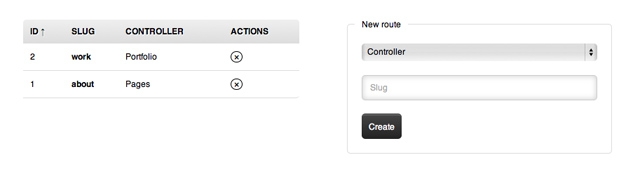
Managing routes via MySQL queries is pretty the same as editing the routes.php file. To make this type of routing meaningful, you should develop a tool for your backend that allows to manage `app_routes` table. Have a look at mine for an idea:

35 comments. Write?
I’m not so sure this is a great idea from a performance standpoint; unless of course you have an index on the “slug”. Personally I’d be more inclined to use redis for this sort of mapping.
Thanks for stopping by, Micheil. In terms of performance, database was never a good choice. Reading file was always faster. So probably it’s more a matter of choice or situation, because whatever your write (markup, CSS or server-side code), you balance between performance and functionality.
Yes, to hit database at least once on every request is not very good thing, but I must also tell, that it depends on the size and scale of the website. In your case, this solution is not very bad I think. Ok, maybe you loosing 0.01 seconds on every request :D
For the bigger project - sometimes you are really fine with routes.php file. Because you just ship application which is fully configured and all the modules already loaded and added to the route. Well, in my own experience, usually I do not need to load modules dynamically…
If you creating modular CMS, which will be used by other developers and they want to load modules dynamically, then maybe Redis or other NoSQL database would be nice thing to use here.
Kudos for your expertise, Ignas. Could not agree more!
Osvaldas Valutis, Reading file was always faster? Where do you think the database store data? :) I agree with Ignas, everything depends on the number of visitors. If you have a big load - the best solution IMHO is static html files.
Osvaldas Valutis, Gud one.
For performance boost we can use “Redis” key-value store database lightning fast !!!
Not a bad post, I do something similar with my 404 pages to handle custom pages created by the user in one of my CMS’s.
You don’t need to route everything in CodeIgniter, you simply name your controllers in relation to the slug. /blog/ will look for blog_controller.php and so on.
Very nice tip, thanks Osvaldas
Great,this worked for me.
Thank you!
Great tips, keep work guys.
Thank you for the nice tips :)
You could always just cache the db results to file or memcache and then empty the cache when you create a new record/route in your admin.
That way it only hits the database once and subsequent look ups are done via cache until a new route is added.
Good post. I just started working on an app with CI and was a bit annoyed with updating my routes file every time I added a new controller.
I do this in my personal CI projects and I find caching the DB results makes this technique just as fast as defining the routes in the routes.php file. Remember, cache every single database read request that you can.
codeihniter çoklu dil konusunda uzun süredir aradığım çözümün bir parçası , teşekkürler.
good trick for routing code igniter multi language problems. thank you.
Great tutorial! I’ve been searching for this stuff hole Internet! Thx!
if you work without db. this time using cache, after every app_router table process, write a file and include to router.php file. isnt it ?
Very nice. I am going to implement this in my projects… convenient too!
Your post is too good. But I am agree with “Andrew” need to use cache mechanism , it will hit db only once rather than every time.
Thanks
Hello, I am trying to unsubscribe but it won’t work, this is the error I am getting [...]
Thanks for letting me know this. And sorry about that, Akismet isn’t doing a good job so far. Unsubscription should work now. I have also unsubscribed you manually.
Thank you, and i am loving your blog…. i was just getting to much emails :p
I will prefer to keep these entries in Array instead DB.
Which won’t decrease the performance & will easy to use.
Thanks
Along with CodeIgniter development, migration but also integration from a particular server to another server is a lot easier. Additionally, there’s a simple possiblity to feature new technology which have no change in customization.It is very useful to php developers.
I was looking for this. Thanks!
What’s up, just wanted to tell you, I loved this post. It was practical. Keep on posting!
On your place I would try to solve this problem itself..
instead of retrieving all routes from database just retrieve current one if found using $_SERVER[‘PATH_INFO’]
Question:
How to combine this with CMS system?
Basically I have 1 template.
If I’m opening http://www.site.com/admin , only center of the content change ( “Welcome”) . But the template still the same
If I’m opening http://www.site.com/admin/module1, still only center of the content change too (“welcome to module 1”) something like that and template is still the same..
So it’s a modularize system. But I dont’ know how to make it right with multiple controller.
Hope you can help give me a clue :).. Thanks alot..
@Daryl: create db table with layouts. in one column you will add filename without php extension.
Then add viewid after slug or controller columns in your route table. Views could be either a file or dynamic page content from another table. Then use CI Template parser to parse the results. You could add the results from your database in an array.
I am using this one myself:
private $aInfoPageDictonary = array(
‘layout’ => array(
‘file’ => ‘’,
‘meta_title’ => ‘’,
‘meta_keys’ => ‘’,
‘meta_desc’ => ‘’
),
‘sections’ => array(),
‘template’ => array(
‘file’ => ‘’,
‘page’ => array(
‘page_heading’ => ‘’,
‘page_content’ => ‘’,
‘page_footer’ => ‘’
)
)
);
Add two different layouts in your layout table. You could also use a key to determine by the slug if its an adminpage or userpage. When you add a route you could use /admin/login or /user/login or /, or /about. All of these slugs could have their own layout determined by a simple key!
Good luck and happy coding!
Thanks Friend, It helps.
this is something i have been looking for so long.
works like a charm. many thanks.